Leica Cyclone Workflow: Registration, Model Prep & BIM Delivery
Leica Cyclone workflow for Scan to BIM: Cyclone REGISTER, cleaning, control, TruView, exports to E57/RCP, and QA practices for building and plant projects.
BimzstudioJan 13, 202618 min
Leica CycloneCyclone REGISTERLeica point cloudScan to BIMTruViewlaser scan registration
Leica Cyclone Workflow: Registration, Model Prep & BIM Delivery
Leica Cyclone remains a cornerstone ecosystem for high-end terrestrial laser scanning. Whether your team uses Cyclone REGISTER / REGISTER 360, Cyclone model tools, TruView publishing, or related Leica workflows, the goal in Scan to BIM is the same: produce a registered, controlled, well-documented point cloud package that designers can trust.
Leica scanners are often chosen for accuracy-critical environments—industrial plants, airports, hospitals, heritage, and complex commercial cores. That investment only pays off if Cyclone processing is methodical. This article lays out a practical Leica Cyclone workflow for BIM-oriented delivery: project setup, registration strategy, control constraints, cleaning, QA, exports, and handoff into Revit/ReCap or open formats.
Note: Leica’s product names and modules evolve. Treat the principles below as durable process guidance and map them to your current Cyclone/Register 360 module set.
Cyclone pipelines reward strong control and consistent naming.
Cyclone-related project failures rarely look like software crashes. They look like BIM pain:
Multi-floor misalignment discovered only after weeks of modeling
Plant grid transformation applied incorrectly, shifting nozzles by tens of millimeters
Huge unpublished databases with no deliverable E57/RCP for the design team
TruView used as a substitute for metric QA (“it looks aligned”)
Inconsistent cleaning between zones causing density shocks for modelers
Unclear which Cyclone project revision is authoritative in the CDE
The problem to solve is operational: make Cyclone the authoritative registration and QA environment, then publish immutable interchange files for modeling. BIM teams should not reverse-engineer registration inside Revit.
Why It Happens
Module confusion. Teams mix Register 360 field workflows with office Cyclone habits without a written SOP.
Control last. Local registration looks perfect; geo-reference is bolted on late and wrong.
Delivery mismatch. Client BIM standards ask for RCP/RCS while the survey team only archives proprietary databases.
Over-reliance on automatic registration. Glass halls, long tunnels, and repetitive offices can fool automation.
Insufficient field targets/black & white targets/spheres where geometry is weak.
No modeling feedback channel. Modelers hack cloud positions instead of triggering registration fixes.
Industry Examples (EU/USA)
European projects
Leica systems are widespread among EU survey firms delivering to ISO 19650-minded clients. Cyclone registration reports and E57 packages enter CDEs as information containers. Heritage and infrastructure-adjacent buildings often require national grid ties and formal uncertainty statements.
Example: a Nordic airport landside renovation uses Leica terrestrial scans registered in Cyclone against airport control, with zone exports per pier phase and TruView for stakeholder walkthroughs under controlled access.
United States projects
US EPCs and reality-capture firms use Cyclone heavily for industrial facilities and large campuses. Deliverables often include Register 360 project bundles, E57, and ReCap-ready outputs for Autodesk modeling vendors. A Gulf Coast unit scan may constrain registration with surveyed plant monuments and publish nozzle coordinate checks from the registered cloud.
Across regions, owners are less impressed by brand and more impressed by residuals, control statements, and modeling outcomes.
Technical Explanation
Publish lean project clouds for modelers; keep archives separate.
Workflow layers
Field acquisition (Leica scanner, targets, notes)
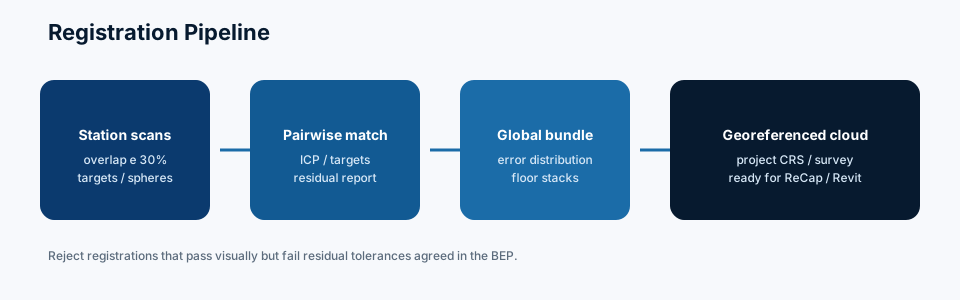
Registration (Register 360 / Cyclone REGISTER)
Control / geo-referencing
Optimization & cleaning
QA & reporting
Publishing (TruView optional; E57/RCP mandatory for many BIM paths)
TruView (or similar panoramic viewers) is excellent for communication, RFIs, and remote site walks. It is not a replacement for a registered exchange cloud and residual report. Use both.
Exports that BIM teams need
E57 (interchange/archive)
Structured formats for ReCap indexing
Region splits by level/zone
Optional UCS/origin markers
PDF registration and limitation report
Sometimes CSV of surveyed/check points
Best Practices
Handover checklists should include CRS, units, and residual reports.
Maintain a company Cyclone SOP mapped to current module names.
Register during the campaign when logistics allow—find holes early.
Use targets at vertical transitions and long-axis intervals.
Always reserve independent check points.
Freeze a Published registration revision; don’t keep moving it silently.
Name exports to match BEP/CDE codes.
Provide TruView for engagement and E57/RCP for production.
Require modeling kickoff only after Revit link smoke test.
Version reports with the same revision ID as the cloud.
Feed modeler-found issues back to Cyclone owners within a fixed SLA.
Step-by-Step Cyclone Workflow
Step 1: Method statement
Define accuracy targets, target plan, control source, cleaning rules, export list, and QA metrics.
Step 2: Field execution
Capture with overlap and target visibility; log mirrors, fencing, and no-go zones.
Step 3: Create/register project
Import setups; build correspondences; solve groups/clusters by zone then merge carefully.
Step 4: Inspect critically
Stairs, courtyards, facade loops, rack ends. Review error stats and spatial distribution of constraints.
Step 5: Apply control
Introduce survey points; solve; validate with unused checks; confirm units.
Step 6: Clean and optimize
Consistent filters; manual edits; segment floors.
Step 7: Internal QA
Distance checks, visual striping, optional CloudCompare C2C against a prior truth tile.
Step 8: Publish packages
E57/RCP regions + report + TruView if required. Enter CDE as Shared pending acceptance.
Step 9: Client acceptance
Address comments; promote to Published; lock revision.
Step 10: Support BIM production
If zipper appears in modeling, fix registration—don’t normalize bad clouds as “Revit problems.”
Case Study
Project: Hospital clinical lab renovation, USA, with EU-manufactured modular cleanroom components requiring tight interface tolerances.
Challenge: Two scanning crews covered adjacent wings on different nights. Each wing looked good alone; the connecting corridor showed a 9–15 mm mismatch in Cyclone visual overlays after a hasty merge.
Resolution: The Cyclone lead broke the merge, added shared targets in the connector (rescanned in a short access window), constrained both wings to common control, and re-exported. Modeling of utility connections proceeded with verified corridor geometry.
Impact: Avoided incorrect prefabrication of corridor rack modules. The Cyclone revision and report were cited in the RFI closeout as the authority.
Common Mistakes
Treating automatic registration as final without loop checks
Exporting before control validation
No independent check points
Publishing TruView only
Inconsistent zone overlaps between crews
Silent re-registration after modeling started
Over-filtering stainless/dark equipment rooms
Ignoring unit mismatches between survey control files and scanner projects
One enormous unsplit cloud for a multi-wing facility
Letting each modeler move the linked cloud independently
Expert Tips
Build a “vertical QA” saved view template for every multi-story job.
Keep a transform log: each matrix applied, by whom, when.
For plants, tag tie-in flanges in TruView and list coordinates in the report appendix.
If using Register 360 in the field, still perform office peer review on critical assets.
Standardize color scales in reports so clients learn your visual language.
Pair Cyclone deliverables with a simple occlusion map drawing—modelers love this.
When mixing mobile Leica systems with terrestrial, declare terrestrial as the accuracy parent unless proven otherwise.
Store checksums of Published E57 files to detect silent overwrite.
Train PMs to read residual tables—acceptance should not be only a surveyor skill.
Align Cyclone container IDs to ISO 19650 naming if the project requires it.
Future Trends
Leica workflows continue moving toward tighter field-to-cloud collaboration, automated registration assistants, and integration with digital twin platforms. AI will help classify and clean, while metrology-grade control will remain non-negotiable for industrial and healthcare interfaces.
Expect more demand for living registered realities—periodic rescans registered to the same control—feeding AIM updates. Cyclone’s role as the registration system of record will persist even as viewing becomes more browser-based.
Register 360 in the Field Without Losing Office Rigor
Field registration tools accelerate confidence and reduce missed coverage, but office peer review still matters for high-risk assets. A balanced approach:
Use field registration to confirm overlap and rough quality nightly
Lock provisional clusters for internal use only
Perform control-constrained final registration in office workflows
Publish only after independent checks
Never let a field “looks good” screenshot replace residuals
This two-stage discipline catches both capture gaps and mathematical registration issues.
Control Files and Unit Traps
Cyclone projects inherit disasters from bad control imports: feet vs meters, wrong zone, swapped axes, outdated monument coordinates. Before applying control:
Validate a few known distances in the scanner project
Confirm control file units and coordinate system with the surveyor of record
Apply and check with unused points
Record the transform parameters in the QA PDF
If anything is ambiguous, stop. Modeling on a wrong grid is worse than delaying publish by a day.
TruView as a Coordination Accelerator
TruView (and similar) helps architects, MEP leads, and owners understand site conditions without opening heavy clouds. Use it to:
Mark RFI locations with panoramic context
Train subcontractors on access routes
Review occlusion areas collaboratively
Support security-minded limited access viewing
Still require metric exports for modeling. Panoramas persuade; registered clouds measure.
Revision Control When Buildings Change Mid-Campaign
Airports, hospitals, and plants change while you scan. A door installed, a scaffold erected, a spool replaced—multi-week campaigns need change logs. Tag setups by date, note observed changes, and avoid forcing incompatible epochs into one silent blend without disclosure. If necessary, publish epoch A and epoch B as related containers.
What BIM Vendors Should Demand in a Leica Package
A modeling-ready package typically includes:
Registered regional E57/RCP set
Coordinate and units statement
Registration residuals and check point results
Occlusion/limitations map
Target/control diagram
TruView links if contracted
Revision ID matching CDE metadata
If any of these are missing, pricing and schedule risk rise. Ask for them at tender.
Industrial and Healthcare Precision Notes
For fabrication tie-ins and clinical interfaces, supplement Cyclone registration with targeted total station verification on critical points. Laser clouds excel at context; discrete survey checks excel at high-value coordinates. Put both in the same QA narrative so fabricators see a coherent evidence trail.
FAQ
Is Cyclone required if we only need Revit models?
Someone must register and QA the cloud rigorously. That may be Cyclone, SCENE, or another platform. For Leica-heavy fleets, Cyclone is the natural system of record.
Register 360 vs full Cyclone—what do we need?
Field-friendly registration tools accelerate campaigns. Complex control, large site QA, and certain deliverables may still need broader Cyclone office workflows. Match tools to risk.
What export should BIM vendors ask for?
Typically E57 plus ReCap-ready files, a coordinate statement, and a registration QA PDF. Confirm with the modeling pipeline.
Can TruView replace going to site?
It reduces trips and helps RFIs, but metric modeling still needs the registered cloud and sometimes field verification at critical nodes.
How do we handle updates after demolition?
Create a new registered campaign tied to the same control; do not casually paste new clouds into old revisions without a method.
What residual errors are acceptable?
Define in the specification relative to scanner capability and use case. Fabrication tie-ins need stricter handling than general architectural planning.
Summary
A reliable Leica Cyclone workflow turns raw Leica scans into defended, BIM-ready reality: deliberate registration, control constraints, cautious cleaning, revision-locked exports, and reports that survive client scrutiny. TruView helps people understand the site; E57/RCP and residuals help people build correctly. Keep Cyclone as the authority for registration fixes, and let modeling tools consume Published truth rather than invent it.
Mobilization Checklist for Leica-Heavy Campaigns
Before the first setup:
Confirm scanner calibration/service status per company policy
Prepare target kit quantities for the geometry type
Obtain control file and validate monuments on site
Agree naming codes with BIM/CDE managers
Pre-build folder structures for Register/Cyclone projects
Confirm export requirements with the modeling vendor
Schedule peer review slots after each major cluster
Mobilization discipline prevents “we’ll sort it in the office” optimism that collapses under deadlines.
Glass, Atria, and Featureless Corridors
Leica accuracy does not repeal physics. Glass atria and long featureless corridors still need targets, control, and thoughtful setup planning. If automatic registration struggles, that is a signal—not a nuisance. Add constraints. Do not crank acceptance thresholds until the software stops complaining.
Handoff Meeting Agenda With BIM Modelers
A 30-minute handoff saves days:
Coordinate system and units walkthrough
Region map and naming
Known occlusions
Residual summary
How to report suspected registration issues
Revision policy
Viewer links for context (TruView)
Sample measurements for sanity check together
If modelers and surveyors never meet, blame games fill the gap.
Specifying Cyclone Deliverables in Tenders
Owners should ask for outcomes, not buzzwords:
Registered clouds in stated formats
Control residuals and check points
Method statement
Occlusion register
Revision-controlled publishes
Optional TruView
Native project archive for high-risk jobs
Then score bids on whether the method can actually produce those outcomes in the access windows available.
Continuous Improvement Metrics
Track internal metrics: percent of projects needing resurvey, average time from last setup to Shared publish, number of modeler-reported registration defects, and peer-review catch rate. Improve the SOP where metrics hurt. Tools improve yearly; process maturity compounds.
Bridging Cyclone Outputs to Plant and Building BIM Tools
Coordination teams: Navisworks-friendly formats and TruView for context
QA teams: residuals and optional CloudCompare-ready exports
Ask at kickoff who consumes what. Then design Cyclone exports once, correctly, instead of re-exporting under panic every Friday. A simple consumer matrix in the method statement prevents half of delivery friction.
Finally, agree a defect SLA: if a modeler suspects registration error, they submit a packaged issue within 24–48 hours with screenshots and approximate coordinates. Cyclone owners respond with confirm/fix/revise. Without an SLA, people silently nudge clouds and poison the federation.
Work with Bimzstudio
Bimzstudio delivers Scan to BIM from professionally registered Leica datasets—Point Cloud to Revit modeling with LOIN clarity, deviation-aware QA, and CDE-friendly packages for EU and USA clients. If you have a Cyclone/E57 package ready for modeling, or need help specifying registration QA for a complex facility, visit bimzstudio.com.