FARO SCENE Workflow: Registration, Cleaning & Export for Scan to BIM
FARO SCENE workflow for Scan to BIM: project setup, registration, target strategy, cleaning, QA, and exports to E57/ReCap/Revit-ready point clouds.
BimzstudioDec 23, 202517 min
FARO SCENElaser scan registrationFARO point cloudScan to BIMSCENE workflowterrestrial scanning
FARO SCENE Workflow: Registration, Cleaning & Export for Scan to BIM
FARO SCENE is a core processing environment for teams capturing buildings and plants with FARO terrestrial laser scanners. In Scan to BIM, SCENE is often where survey truth is established: setups are registered, targets are solved, filters are applied, and exports are generated for ReCap, Cyclone interchange, Navisworks, or direct modeling pipelines.
A weak SCENE workflow creates silent risk—drift between floors, incorrect scale assumptions, messy colorized clouds, and exports that modelers cannot navigate. A strong workflow produces a defended registration, documented residuals, clean-enough clouds, and predictable file packages.
This guide details a practical FARO SCENE workflow for BIM deliverables in occupied buildings, industrial sites, and phased renovations across EU and USA project contexts.
SCENE workflows start with disciplined on-site target and station logs.
FARO hardware can capture excellent data and still yield a poor project cloud if SCENE processing is rushed. Typical failure modes:
Clusters register internally but the building is banana-curved over length
Stair connections between floors are visually “fixed” while vertical control is wrong
Moving people and doors create noise that survives into Revit
Exports omit key setups or duplicate overlapping mess
Colorization issues make interpretation harder without improving metric quality
No registration report is issued, so BIM teams inherit unknown uncertainty
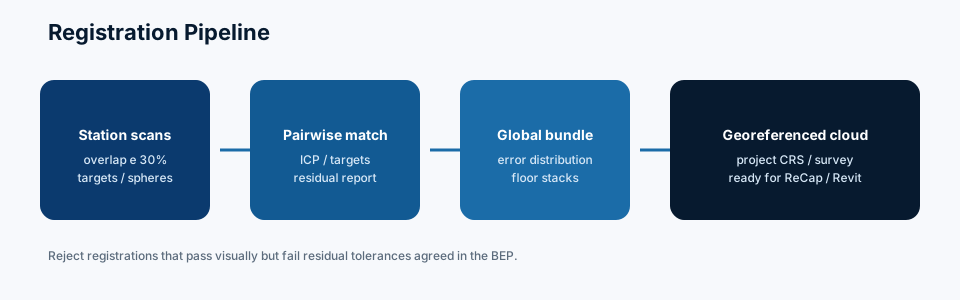
Scan to BIM needs SCENE to act as a metrology gate, not only a pretty viewer. That means targets/control strategy, residual review, cleaning policy, and export standards written into the scan method statement.
Why It Happens
Field haste. Too few setups in congested MEP; occlusions forced later guesswork in modeling.
Target shortcuts. Skipping spheres/checkers in repetitive corridors where cloud-to-cloud can slip.
Processing by interns without QA sign-off. SCENE is approachable; registration judgment is not automatic.
Over-filtering. Removing low-intensity returns that were actually dark steel or distant structure.
Inconsistent project templates. Each technician uses different filter defaults.
Late coordinate conversation. SCENE cluster is registered locally; survey control applied incorrectly at the end.
Export sprawl. Everyone asks for a different format; the team loses track of the authoritative published cloud.
Industry Examples (EU/USA)
European projects
EU scan providers often deliver SCENE-based registration reports with target statistics and place E57 into client CDEs. Metric control tied to national grids is common on campuses and infrastructure-adjacent buildings. A Netherlands hospital night-scan program, for example, may use spheres at corridor intersections and require SCENE cluster QA before ReCap publishing.
United States projects
US market teams frequently move from SCENE to ReCap for Revit linking. Industrial clients may request native FARO project archives plus E57. A US manufacturing plant turnaround scan might emphasize target distribution on pipe racks and SCENE correspondence views for acceptance before modeling starts.
Shared expectation: show the registration logic. Screenshots of a colored building alone are not QA.
Technical Explanation
Validate residuals before exporting to ReCap or modeling tools.
Residuals table, hotspot screenshots, known occlusions, distance checks.
Step 9: Export
Publish E57 + ReCap-oriented files + PDF report into CDE WIP/Shared.
Step 10: Modeling feedback loop
If modelers find zipper issues, reopen SCENE—don’t “nudge” only in Revit.
Case Study
Site: University science building, EU, with USA research equipment vendor needing precise shaft clearances.
Issue: Initial SCENE registration used mostly cloud-to-cloud in a repetitive lab corridor. Vertical connection through a stair showed a 12 mm progressive mismatch floor-to-floor.
Correction: Added surveyed control on three floors and additional spheres in the stair volume, re-registered, and re-exported. Shaft modeling then matched multi-floor alignments.
Lesson: Repetitive architecture needs targets/control, not confidence from local visual fit alone.
Common Mistakes
No targets on multi-floor jobs
Accepting high residual outliers instead of investigating
Exporting before geo-reference validation
Over-aggressive stray point removal in dark plant rooms
Forgetting to include a few exterior setups for facade ties when needed
Mixing two campaign dates without checking movement/changes
Delivering only screenshots as “registration report”
Ignoring moving doors scanned half-open across setups
Using different filter stacks per floor silently
Letting modelers compensate for registration error by moving linked clouds ad hoc
Expert Tips
Place spheres so each is seen from ≥3 setups when possible.
In glass atriums, plan incidence angles and accept holes rather than fake fill.
Create a “stair/elevator vertical QA view” as a mandatory checklist item.
Color by scan (setup) occasionally to see which instrument positions contribute.
Keep a laminated field card: minimum overlap, target spacing guidance, naming codes.
For industrial sites, protect targets from being moved by operations staff—use signage.
If using SCENE with later CloudCompare C2M, export a faithful metric cloud, not an over-decimated preview.
Record temperature/environment notes for large steel plants where expansion might matter for precision jobs.
Automate naming as much as possible to match BEP container IDs.
When clients require both native SCENE and E57, treat E57 as interchange and SCENE as method archive.
Future Trends
FARO ecosystems continue to push faster on-site registration, better mobile+terrestrial fusion, and cloud collaboration features. AI noise classification will assist cleaning, while clients will still demand residual transparency.
Scan to BIM providers will increasingly standardize machine-readable registration reports. SCENE will remain a key native environment for FARO fleets even as open formats carry data into multi-vendor BIM stacks.
Field-to-Office Feedback During Active Campaigns
The highest-value SCENE habit is processing while the crew is still on site. Night one capture, morning registration review, afternoon gap-fill setups—this loop prevents discovering missing plant-room corners after demobilization.
Practical tactics:
Daily cluster registration for the zones scanned
A shared “holes and risks” list updated each morning
Pre-agreed escalation if residuals exceed limits
Spare targets staged for weak geometry areas
Travel and escort costs make resurmobilization expensive. Catching gaps early is pure schedule insurance.
Target Placement Strategy That Survives Real Sites
Textbook target networks die on active sites. People move spheres. Forklifts hit stands. Security forbids markers in certain halls. Design resilient placement:
Redundant targets at junctions
Surveyed control nails/monuments that cannot be casually relocated
Photos of each target location
Notes when a target was disturbed mid-campaign
Prefer combinations of spheres and checkerboards based on distance and lighting
If a target disappears between setups, document it; do not silently force a weak cloud-to-cloud bridge without QA review.
From SCENE to Autodesk Modeling Stacks
Most building Scan to BIM teams eventually need ReCap/Revit. Make the handoff boring and repeatable:
Finalize registration and control in SCENE
Clean consistently
Export E57 and/or ReCap-friendly outputs by region
Smoke-test in ReCap and Revit
Publish with matching QA PDF revision
Do not keep “improving” registration after modelers start unless you issue a new revision and communicate movement impacts.
Industrial Rack Special Notes
For pipe racks and process units:
Increase setup density for occlusion
Use targets at rack intersections and elevation changes
Expect steam/dust artifacts; plan cleaning and possible resurvey
Export clash corridors as separate packages
Keep native SCENE archive for metrology disputes
Fabrication stakeholders may ask for point coordinates at flanges—be ready to support that from the registered cloud plus survey checks.
QA Peer Review Checklist
Second-person review should confirm:
All setups present
Residuals within stated limits
Control checks passed
Stair/vertical continuity OK
Long corridor curvature not present
Filters not over-aggressive in dark rooms
Export naming matches BEP
Occlusion list included
Peer review is cheaper than remodeling a banana-shaped building.
FAQ
Do we need targets if SCENE cloud-to-cloud is good?
For small, unique geometry spaces, maybe not. For long, repetitive, multi-floor buildings, targets/control are strongly recommended.
What residual is acceptable?
Depends on specification and scanner/setup. Define limits in the method statement and investigate outliers rather than only chasing an average.
Should modeling start from SCENE directly?
Often teams export to ReCap/E57 for Revit workflows. Direct paths exist but standardization matters more than ideology.
Can SCENE fix missing field data?
It cannot invent occluded geometry. It can help you detect gaps early if you process during the campaign.
How do we handle multi-week campaigns?
Register in blocks, re-check control, and document interim changes in the building between weeks.
What should be in the deliverable package?
Registered cloud (agreed formats), SCENE archive if contracted, residuals report, occlusion notes, coordinate statement.
SCENE Delivery Checklist for Autodesk Handoffs
Cluster hierarchy named by building/floor/zone
Registration report exported and archived with project CDE
Colorization policy stated (on/off for modeling tiles)
Export tiles match modeling regions; no anonymous mega-file
Coordinate system screenshot and control note included
Known weak stations listed (glass, vibration, incomplete coverage)
Modeling team confirmed section-box starting views
Extra FAQ
Should we always colorize before modeling?
Not for dense MEP. Intensity often reads geometry better; RGB helps stakeholder communication and finish classification.
Summary
A professional FARO SCENE workflow establishes registration integrity, applies controlled cleaning, ties clouds to project coordinates, and exports predictable packages for Scan to BIM. Treat SCENE as your metrology gate: targets and control where risk demands, residuals reviewed by a second pair of eyes, and no Shared publish without a smoke test in the modeling environment.
Placeholders for coordinate readme and occlusion register
Update the template when you learn a painful lesson—templates should be living, not sacred fossils.
Colorization: When It Helps and When It Distracts
Color helps non-survey stakeholders interpret spaces and read signage/tags. Poor colorization, however, can hide geometric issues behind pretty textures. For metric QA reviews, toggle color off and inspect geometry. For client walkthroughs, color on. Do not let marketing screenshots substitute for residual tables.
Handling Multi-Instrument and Multi-Day Clusters
Large jobs combine multiple scanners and days. In SCENE:
Keep clear cluster boundaries
Verify day-to-day joins with targets/control
Watch for building changes between days
Document which instrument serials contributed if troubleshooting artifacts
Banana effects often appear at joins between days when target discipline is weak.
Export Packaging for Distributed Modeling Teams
If five modelers work in parallel, give them five coherent packages—not one labyrinth. Each package needs overlap, a boundary drawing, and a note about which adjacent package owns shared elements. SCENE exports should mirror that packaging strategy so ReCap regions stay aligned to work allocation.
Dispute Resolution Using Native Archives
When a fabricator disputes dimensions, the native SCENE project plus control report is your courtroom evidence. Keep it. E57 is interchange; SCENE can be the method archive proving how registration was solved. Contract for archive delivery when the risk profile warrants it.
Example Registration Report Contents
A client-ready SCENE registration report can be short and still rigorous:
Project name, dates, scanner models, SCENE version
Coordinate system and units statement
Target types and count; survey control source
Mean/max target residuals; check point residuals
Cluster strategy (by floor/zone) and join method
Known occlusions and dynamic objects remaining
Cleaning filters applied (and what was not removed)
Export list with filenames and revisions
Sign-off by processor and peer reviewer
Attach three or four annotated screenshots: a plan overlap, a stair section, a long corridor check, and a problem area if any. Transparency builds trust; hiding uncertainty destroys it later.
If residuals exceed limits, say so and describe mitigation (additional setups, local resurvey, or modeling assumptions). Honesty is part of professional surveying culture and should be part of Scan to BIM culture too.
Training Path for SCENE Processors
New processors should progress through: sample office registration → peer-reviewed real project under supervision → unsupervised publish rights. Include at least one multi-floor building and one congested MEP/plant example before sign-off. The skill is judgment under imperfect geometry, not only menu familiarity. Schedule quarterly calibration exercises where the team registers the same sample dataset and compares residuals—drift in team habits becomes visible quickly. Keep the sample dataset and expected residual band in a shared training folder so new hires can self-test before they touch live client work. Treat that folder as controlled training material—version it when scanner models or SCENE defaults change.
Work with Bimzstudio
Bimzstudio consumes well-registered FARO datasets regularly for Point Cloud to Revit modeling with LOIN discipline and QA. If your team needs Scan to BIM from SCENE/E57 deliverables for EU or USA facilities, share your registration report and scope at bimzstudio.com.