

Noise & Artifact Removal
People, vehicles, reflections and scanner artifacts are stripped so fabric edges read clearly.

Point Cloud Processing · Denoise & Classify
We remove noise, clip irrelevant regions and classify building-relevant surfaces so your Scan to BIM team works from clean, efficient point clouds — not cluttered raw captures.


Problem Statement
People, vehicles, vegetation, reflections and scanner artifacts inflate file size and obscure building fabric. Teams waste modeling hours discriminating signal from noise instead of authoring BIM.
Our Solution
BIMZ Studio denoises, clips and classifies your registered cloud — isolating architectural, structural and MEP-relevant surfaces — so modeling and deviation analysis run faster and more accurately.
Denoise & Clip
Classification
QA Sample Checks
Faster Modeling Starts
Langue
Benefits
Cleaner clouds mean faster modeling, smaller files and more reliable deviation checks.
People, vehicles, reflections and scanner artifacts are stripped so fabric edges read clearly.
Floors, façades and plant areas can be segmented for phased modeling packages.
Reduced density where safe keeps Revit and ReCap responsive without losing critical detail.
Cleanup never substitutes for registration — we protect control-aligned geometry throughout.
Deliverables drop straight into your Scan to BIM or as-built workflow.
Workflow
From registered raw cloud to a lean, classified dataset built for BIM authoring.
We confirm which regions, disciplines and density levels matter for your modeling scope.
Noise sources, occlusions and density variation are mapped before processing.
Clip extents, classification schema and export formats are agreed with your BIM lead.
Denoising, clipping and classification run with manual QC on critical building fabric.
Before/after samples confirm fabric integrity and that required detail remains.
Cleaned cloud packages and notes are delivered for immediate modeling kickoff.
Methodology
Practical definitions, limitations and commercial factors — written so they stay true from one project to the next.
Cleanup removes noise, transients and irrelevant points so modelers work from building fabric rather than people, vegetation or scanner artifacts.
Noisy clouds inflate file size and hide edges that Revit, Archicad or DWG work depends on. Cleanup does not replace registration; both affect downstream accuracy.
Next step
If this service matches your brief, request a scoped proposal. Commercial terms depend on the project requirements you submit.
Deliverables
Lean, classified clouds with clear notes on what was removed and why.

Denoised and clipped cloud in E57, RCP or agreed format.
Segmented regions for architecture, structure or MEP-focused modeling.
Summary of filters, clips and density decisions applied.
Before/after visuals on representative areas for client sign-off.
LOD Support
LOD is specified by category and project stage. Not every engagement requires every LOD.

LOD 200
Generalized systems and approximate quantities for schematic design coordination.
LOD 300
Accurate size, shape, location and orientation suitable for design development.
Software Used
Industry-standard authoring and QA software, chosen to match how your team already works.
Autodesk ReCap Pro
Cloud cleanup, regions and indexing.
CloudCompare
Advanced filtering, segmentation and diagnostics.
Leica Cyclone
Survey cloud editing for Leica projects.
FARO Scene
FARO project cleanup and export.
Industries
The same coordinated, QA-checked modeling pipeline, tailored to each sector's compliance and detail requirements.
 London · New York · EU · USA
Coordinated Revit and Archicad delivery for HQ campuses, towers, and mixed-use schemes across London, New York, and major EU and US business districts.
 London · New York · EU · USA
Multi-building housing and podium schemes modeled for phased handover across Northern Europe and major US metro markets, including London and New York.
 EU · USA
Process-plant and manufacturing models with constructible MEP outcomes for facilities across Europe and the United States.
 EU · USA
Scan-to-BIM digital twins for bridges, corridors, and airside assets supporting civil teams across Europe and the United States.
FAQ
Answers to what teams most often ask before starting a point cloud cleanup project.
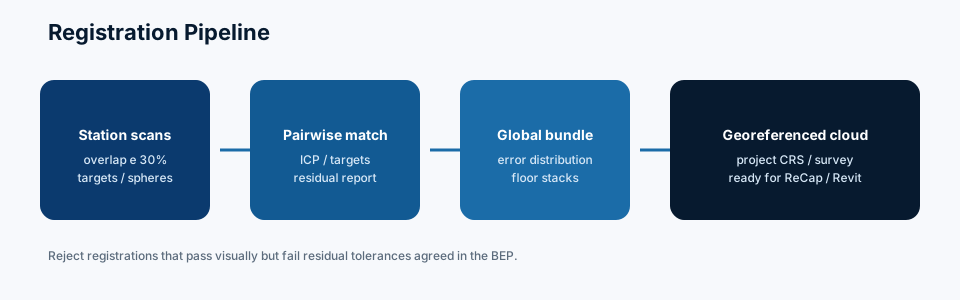
Registration first. Cleanup on a unified, control-aligned cloud avoids rework and preserves survey integrity.
We protect railings, small pipes and façade detail based on your LOD brief — critical features are reviewed manually.
Yes. We can produce modeling-optimized subsets while archiving the fuller registered cloud.
On request. Classification depth is scoped to your modeling packages and schedule.
Most single-building clouds complete in 2–5 business days after registration is finalized.
Related Services
Pair this service with adjacent capabilities for a complete Scan to BIM, coordination and handover pipeline.

Point Cloud Processing
Multi-station laser scan alignment into a single, survey-accurate reference cloud.
Explore Scan RegistrationScan to BIM
Scan-to-BIM: convert registered point clouds into coordinated BIM models at the LOD your project actually needs.
Explore Point Cloud to BIM
Scan to BIM
Point Cloud to Revit: native Revit BIM authored against a registered cloud, organized to your project template where provided.
Explore Point Cloud to Revit
Scan to BIM
Verified as-built BIM models reflecting installed conditions for handover and FM.
Explore As-Built BIM
Scan to BIM
Point Cloud to Archicad: native PLN models from a registered cloud — a Scan-to-BIM delivery route for Graphisoft offices.
Explore Point Cloud to Archicad
MEP & Coordination
MEP BIM: mechanical, electrical and plumbing modeled for coordination — from scan-visible systems or design models.
Explore Modélisation MEPSend a sample region or full registered cloud for a scoped cleanup proposal within 24 hours.
Contact
Reach out directly, or upload your point cloud above to request a scoped proposal based on your project brief. We typically reply after a clear brief.
Livraison à distance
Europe and United States AEC teams