AI in Point Cloud Processing: From Raw Scans to Reliable BIM Inputs
Discover how AI improves point cloud processing—noise reduction, classification, segmentation, and QA—so Scan to BIM teams start from cleaner, trusted data.
BimzstudioJul 29, 202615 min
AI point cloudpoint cloud processingScan to BIMlaser scanningsemantic segmentation
AI in Point Cloud Processing: From Raw Scans to Reliable BIM Inputs
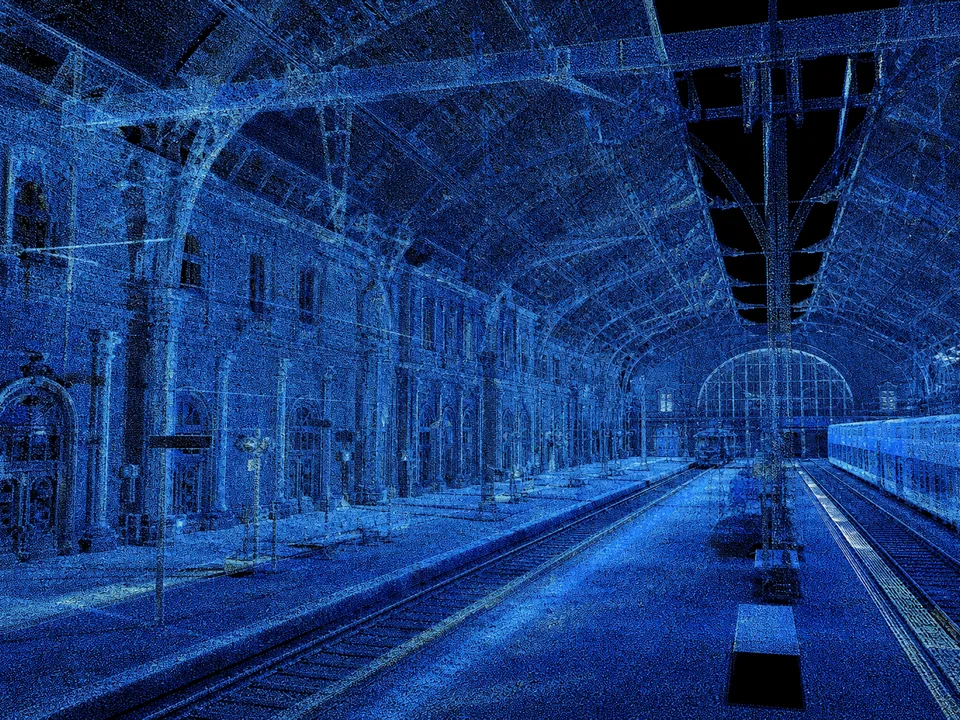
Every Scan to BIM failure that looks like a modeling problem often started as a processing problem. Raw point clouds are noisy, incomplete, inconsistently dense, and semantically blind. Traditional workflows rely on skilled operators to clean, segment, and interpret millions—or billions—of points before anyone places a Revit wall. That craft still matters. What has changed is that AI can now carry a large share of the repetitive perception work, provided teams treat it as a controlled processing stage rather than a black box.
This article is a production guide to AI in point cloud processing for BIM delivery. It covers where algorithms help, how to validate outputs, and how European and US project environments are adopting these methods without abandoning survey discipline.
Clean registration still matters more than the cleverest model.
Point cloud processing sits between capture and modeling. In that middle zone, teams must register scans, remove outliers, manage file size, segment regions of interest, and interpret geometry well enough that modelers can work efficiently. On small projects, experienced technicians can do this by eye. On airports, hospitals, industrial plants, and large campuses, the volume breaks manual methods.
The practical symptoms are familiar:
Modelers spend days “finding” structure inside clutter.
Classification is inconsistent between operators.
Noise from reflective surfaces and moving people becomes permanent geometry.
Oversized datasets crash workstations or force destructive decimation.
QA is subjective: “looks clean enough” replaces measurable criteria.
Clients experience this as delayed models, uneven LOD, and expensive remobilizations when gaps appear late. AI promises automated cleaning, semantic segmentation, object detection, and anomaly flagging. Those promises are real in controlled conditions and fragile when capture quality, training data, and acceptance criteria are weak.
The core problem is not whether AI exists. It is whether processing pipelines can produce BIM-ready inputs with documented confidence, traceability, and human override paths.
Why It Happens
Point clouds are hard because reality is hard. Construction sites change between setups. People walk through scans. Glass and polished metal create multipath returns. Occlusion hides pipe backsides. Mobile mapping introduces trajectory drift. Photogrammetry struggles with textureless surfaces. Static TLS is accurate but time-consuming and still produces uneven density at range.
Traditional processing tools excel at geometry operations—statistical outlier removal, plane fitting, region growing—but they lack semantic understanding. A plane could be a wall, a door leaf, or a temporary board. Manual labeling scales poorly.
AI arrived because deep learning on points, voxels, and multi-view images can learn appearance and shape patterns across large datasets. Yet adoption lags for understandable reasons:
Training data scarcity for AEC classes. Industrial piping, heritage cornices, and hospital headwalls are underrepresented compared with autonomous-driving street scenes.
Domain shift. A model trained on offices fails on process plants.
Integration gaps. Classified points do not automatically become parametric BIM.
Trust and liability. Surveyors and BIM managers need defensible QA, not only colorful overlays.
Compute and workflow friction. Large clouds require tiling strategies and CDE-friendly exports.
Until those constraints are managed, AI remains an accelerator for capable teams—not a substitute for survey fundamentals.
Industry Examples (EU/USA)
Europe: renovation scale and regulated information
In Western and Northern Europe, renovation and retrofit dominate much of the near-term workload. Housing associations and public owners commission repeated floor-plate scanning. AI segmentation that separates architecture, furniture, and clutter allows modelers to focus on building fabric for energy retrofit design. Dutch and German delivery teams often combine TLS with panoramic imagery so classifiers can use color cues on painted services and signage.
Heritage projects in Italy, France, and the UK use AI cautiously: automated plane extraction for primary walls and vaults, with manual control for ornament and irregular stone. The cultural value of accuracy keeps confidence thresholds high and auto-commit rates low.
EU infrastructure owners also apply AI processing to mobile mapping of roads and rail corridors, classifying ground, rails, catenary, vegetation, and street furniture before asset BIM or GIS enrichment.
United States: speed, shutdowns, and industrial density
US healthcare renovations demand rapid above-ceiling documentation between operational periods. AI-assisted removal of transient clutter and preliminary tray/duct segmentation shortens the time from scan to usable modeling environment. Aviation and stadium projects use similar methods for large volumes where manual segmentation is impractical.
In petrochemical and manufacturing facilities across Texas, Louisiana, and the Midwest, ML classifiers help separate steel, pipe, equipment, and insulation. The commercial driver is prioritization: critical path systems are modeled first at fabrication LOD, while non-critical zones remain classified references.
Both regions confirm a pattern: AI processing creates the biggest return when it reduces search time and standardizes first-pass interpretation, not when it claims unsupervised perfection.
Technical Explanation
Segmentation accelerates modeling; it does not invent missing scans.
AI point cloud processing typically includes several algorithm families.
Noise reduction and enhancement
Classical filters (SOR, radius outlier, bilateral) remain useful. Learning-based denoisers estimate likely surface points versus outliers using local neighborhoods and learned priors. On reflective industrial scenes, hybrid methods work best: geometric filters first, then learned refinement, then human review of known problem materials.
Semantic segmentation
Each point (or local patch) receives a class label: wall, floor, ceiling, column, beam, duct, pipe, cable tray, equipment, vegetation, clutter, undefined. Architectures include PointNet-style networks, sparse convolutional networks on voxels, and transformer-based models. Multi-modal pipelines fuse RGB panoramas or orthophotos to improve material discrimination.
Instance segmentation and object detection
Beyond class labels, instance methods separate individual pipes, valves, or furniture pieces. Detection models propose bounding boxes or oriented cylinders for equipment. This matters for quantity logic and for routing modelers to discrete assets.
Feature extraction and vectorization
AI may propose planes, cylinders, and polylines that become wall centerlines, pipe centerlines, or slab boundaries. Vectorization quality determines how much manual remodeling remains. For architectural planes, RANSAC plus learning-based region proposals often outperform either alone.
Change detection and progress analytics
Comparing multi-temporal clouds with learning-assisted correspondence helps identify demolished, installed, or relocated elements. For digital twin programs, this becomes a continuous processing loop rather than a one-off Scan to BIM event.
QA scoring
Modern pipelines attach confidence per point or per cluster, plus coverage metrics (occlusion maps, density maps). These scores should drive modeling priority and remobilization decisions.
Skipping registration QA before AI is a common failure mode. Algorithms will happily classify a misregistered wall twice.
Best Practices
Treat AI suggestions as drafts until deviation checks pass.
Fix registration before classification. AI cannot invent correct topology from drifted setups.
Define a project class taxonomy early. Align labels with BIM categories you will actually model.
Set confidence thresholds by risk. Architecture envelope may auto-draft at 0.85; fire protection never should without review.
Preserve raw and intermediate products. Keep unclassified clouds and classified derivatives for audit.
Use tiling strategies that respect floors and fire compartments. Arbitrary cubes hurt spatial reasoning.
Validate on hold-out zones. Reserve one area for blind QA every package.
Combine RGB and geometry when available. Color helps services; geometry anchors structure.
Do not over-decimate before AI. Aggressive thinning destroys thin elements and edges.
Feed modeler-ready packages. Export segmented regions, centerline candidates, and exclusion masks—not only pretty screenshots.
Measure processing KPIs. Track hours from registered cloud to modeling-ready package, percent auto-accepted area, and remobilization rate due to interpretation errors.
Verify density targets, overlap, control residuals, and known problem surfaces. Document scanner settings and environmental conditions.
Step 2: Complete registration and survey QA
Check residuals, visual seams, and control comparison. Reject or reprocess failed setups before any AI stage.
Step 3: Prepare tiles and metadata
Partition by level, zone, and discipline priority. Attach coordinate system, units, and capture date metadata.
Step 4: Run denoising with material awareness
Apply conservative filters globally, then targeted cleanup near glass, polished floors, and stainless equipment. Review before irreversible deletes.
Step 5: Execute semantic segmentation
Run the classifier with project taxonomy. Generate confidence maps and confusion hotspots.
Step 6: Extract features for BIM
Convert high-confidence planar and cylindrical clusters into candidate geometry. Export open formats your modeling tools accept.
Step 7: Human exception pass
Technicians review low-confidence and high-risk classes. Tag remobilization needs versus model-through decisions.
Step 8: Package for modeling
Deliver classified subsets, section boxes, and notes on occlusion. Include a processing report with metrics.
Step 9: Close the loop with model deviation checks
After draft modeling, compare model to cloud. Feed systematic mismatches back into threshold and taxonomy updates.
Step 10: Standardize for the next package
Update the processing playbook, class dictionary, and acceptance criteria in the BEP or survey method statement.
Case Study
A 65,000 m² European logistics retrofit required architectural and primary MEP Scan to BIM across occupied warehouses with reflective floor finishes and constant forklift traffic. Manual cleanup estimates threatened the design start date.
The team implemented an AI processing pipeline after strict registration QA. Denoising combined statistical filters with a learned outlier model fine-tuned on warehouse sample tiles. Semantic segmentation targeted architecture, racking, temporary clutter, and main overhead services. Racking and transient clutter were masked from the modeling package so architectural modelers were not drowning in inventory noise.
Outcomes:
Processing time to modeling-ready packages fell from an estimated 18 technician-days to 7, including human review.
Architectural modelers reported a 40% reduction in “search and interpret” time on the first two halls.
Confidence maps correctly flagged glass office partitions as low-confidence; those zones were re-scanned with adjusted exposure and targets.
A blind QA hall showed 91% of wall points correctly labeled; most errors were at dock door thresholds with heavy occlusion.
The GC used occlusion maps to justify a short remobilization before detailed MEP modeling, avoiding later RFIs.
The decisive success factor was governance: AI outputs were contractually defined as processing aids, while issued BIM remained under human QA sign-off.
Common Mistakes
Running AI on poorly registered clouds. You get crisp labels on wrong geometry.
Using driving-scene models without adaptation. Street-trained networks misread interiors and plants.
Deleting low-confidence points permanently. Sometimes low confidence means occlusion that needs a rescan, not deletion.
Over-trusting colorful segmentation screenshots. Screenshots are marketing; metrics are production.
Class taxonomies that do not map to BIM. “Metal object” helps no modeler.
Processing the entire site at one detail level. Prioritize critical systems and zones.
Ignoring temporal clutter. People, vehicles, and temporary works must be handled explicitly.
No chain of custody for derivatives. If classified clouds cannot be traced to raw scans, audits fail.
Compressing too early. Heavy decimation before segmentation destroys thin conduits and edges.
Skipping field feedback. When modelers discover repeated misclasses, update the model—do not silently live with it.
Expert Tips
Build a site-specific mini training set whenever you enter a new asset class (labs, heritage, process units).
Keep a “problem materials” checklist tied to capture methods: what AI cannot save, the scanner crew must prevent.
Use density and incidence-angle maps alongside confidence; weak geometry often correlates with grazing angles.
For MEP, cylinder proposals are starting points—always verify slopes, reducers, and fittings manually for fabrication scopes.
Store class colors and codes in a shared dictionary so survey, BIM, and client FM teams speak the same language.
When file size is painful, segment by class and zone rather than blindly thinning everything.
Treat change detection as a processing product for owners who will scan again; design exports for repeatability.
Require processing reports in consultant deliverables: methods, thresholds, QA samples, known limitations.
Pair junior AI operators with senior reality-capture leads for the first three projects.
If a vendor will not explain failure modes, do not put them on a critical path package.
Future Trends
Edge AI on scanners and tablets will flag coverage gaps and likely classification difficulty while crews are still on site. Foundation models trained across larger AEC datasets will reduce domain-shift failures, especially when fine-tuned with small project samples. Tighter links between processing and authoring tools will turn classified clouds into draft BIM assemblies with less manual vectorization.
Expect insurance and client information requirements to ask for processing transparency: confidence thresholds, sampling rates, and human review evidence. Open formats for semantic point clouds will mature, improving handover into digital twin platforms.
The trajectory is clear: point cloud processing becomes a continuous, partially automated perception service feeding design, construction verification, and operations—not a one-time cleanup chore before modeling.
Production Governance and Deliverable Specs
AI processing only becomes bankable when it is specified like any other survey product. A strong method statement answers five questions before the first algorithm runs: What taxonomy will be used? What confidence thresholds apply per class? What sampling rate governs human review? What formats and metadata travel with the classified cloud? What failure modes require remobilization rather than modeling through?
Recommended deliverable package for AI-assisted processing:
Registered cloud with registration report and control residuals.
Classified cloud (or class-layered exports) with confidence attributes where supported.
Density and occlusion maps for modeling prioritization.
Feature candidates (planes/cylinders/polylines) for high-confidence architecture and primary MEP.
Exception log listing low-confidence zones and recommended actions.
Processing report stating software versions, model IDs, thresholds, and QA sample results.
Owners and GCs should reject “AI cleaned” claims that arrive as screenshots alone. Screenshots are communication aids. The package above is the production artifact.
Workstation and cloud operations notes
Large interior projects routinely exceed tens of billions of points across phases. Practical operations include:
Tile by level and fire compartment before inference.
Keep a lossless archive; run AI on working derivatives.
Monitor GPU memory and batch size to avoid silent tile skips.
Parallelize human review queues by zone, not by random point order.
Enforce naming so B1_MECH_classified_v03 cannot be confused with B1_MECH_raw_v03.
Security matters on hospitals, airports, and defense-adjacent sites. If a cloud AI vendor processes your scans, document data residency, retention, and whether your labels train shared models. Many owners now require on-prem or private-tenant inference for sensitive assets.
Connecting processing KPIs to commercial outcomes
Track at least:
Hours from registered cloud to modeling-ready package
Percent of area auto-accepted vs reviewed
Remobilization rate attributed to interpretation error vs true occlusion
Modeling hour delta versus a non-AI baseline package
First-pass clash or deviation defect rate on auto-drafted categories
When these KPIs move in the right direction across two consecutive packages, expand scope. When they do not, fix taxonomy, capture, or thresholds before buying more licenses.
FAQ
Does AI replace traditional point cloud software?
No. It augments registration, cleanup, and interpretation. Survey control, georeferencing, and final QA remain essential.
How much time can AI save in processing?
On suitable large interiors, 30–60% reduction in cleanup/segmentation effort is realistic after calibration. Gains are smaller on tiny or highly unique assets.
Is AI reliable for industrial plants?
Useful for prioritization and rough classification; fabrication-critical piping still needs expert modeling and verification.
What accuracy should we expect?
Processing AI does not create survey accuracy. It interprets existing geometry. Absolute accuracy still depends on capture and registration.
Can AI fix missing data from occlusion?
No. It may interpolate visually, which is dangerous. Occlusion needs rescans or accepted modeling assumptions.
Should classified clouds be a contract deliverable?
Yes, when they inform modeling scope. Define format, taxonomy, confidence fields, and QA sampling in the appointment.
What hardware do we need?
GPU-capable workstations or secure cloud processing. Plan tiling for multi-billion-point jobs.
How do we start without a data science team?
Begin with vendor tools on a pilot floor, demand metrics, and build internal playbooks before scaling.
Summary
AI in point cloud processing is most valuable when it shortens the path from registered scans to modeling-ready, semantically organized data. It helps with denoising, segmentation, feature extraction, and coverage diagnostics—but it does not forgive bad registration or missing capture. European renovation programs and US industrial/commercial projects already demonstrate measurable gains when taxonomies, confidence thresholds, and human exception handling are explicit. Treat AI outputs as controlled intermediates, measure KPIs, and close the loop with model-to-cloud QA. That is how processing becomes a competitive advantage instead of a mysterious bottleneck.
CTA
Need cleaner, faster Scan to BIM inputs from complex point clouds? Bimzstudio designs processing and modeling pipelines that combine AI acceleration with survey-grade QA. Share a sample dataset and we will help you identify where automated processing will save real production time.