
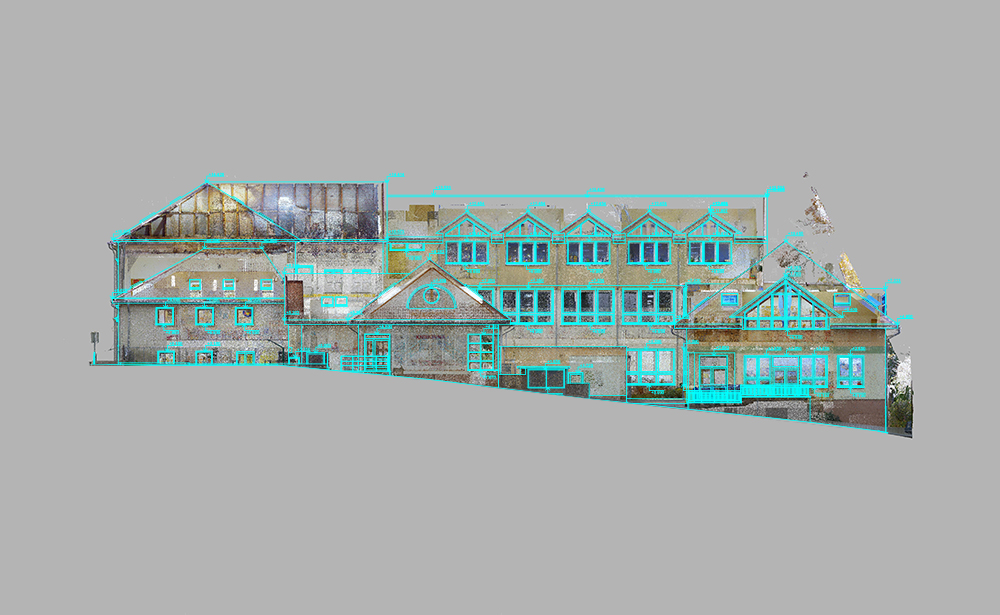
Modern architecture and construction workflows increasingly rely on reality capture technologies such as laser scanning and LiDAR. These tools generate point cloud data—dense 3D datasets that accurately represent existing buildings, infrastructure, or sites. When integrated into a BIM platform like ArchiCAD, point clouds become a powerful foundation for as-built modeling, renovation design, and facility management.
This article explains what point cloud to ArchiCAD workflows are, how they work, and how professionals can use them effectively in real-world projects.
What Is a Point Cloud?
A point cloud is a collection of millions (sometimes billions) of spatial points captured using 3D laser scanners or photogrammetry. Each point contains X, Y, and Z coordinates—and sometimes color information—representing the real-world surface geometry of a structure.
Common sources include:
- Terrestrial laser scanning (TLS)
- Mobile LiDAR scanning
- Drone-based photogrammetry
- Handheld SLAM scanners
The result is a highly accurate digital replica of physical space.
Why Use Point Clouds in ArchiCAD?
Integrating point clouds into ArchiCAD supports several critical workflows:
1. As-Built Documentation
Existing buildings can be documented with millimeter accuracy, reducing reliance on outdated drawings.
2. Renovation and Retrofit Design
Designers can model directly on top of real-world conditions, minimizing errors during renovation.
3. Clash Detection and Verification
Point clouds help validate BIM models against actual site conditions.
4. Heritage Preservation
Historic buildings can be digitally preserved without physical alteration.
Workflow: Point Cloud to ArchiCAD
Step 1: Capture the Site
A laser scanner collects spatial data from multiple positions. These scans are later registered into a unified coordinate system.
Step 2: Clean and Register Data
Before importing into ArchiCAD, point clouds are processed using tools like:
- Autodesk ReCap
- Leica Cyclone
- Faro Scene
This step removes noise, aligns scans, and optimizes file size.
Step 3: Import into ArchiCAD
ArchiCAD supports point cloud integration through industry-standard formats such as E57 or LAS. Once imported, the point cloud acts as a reference underlay.
Step 4: Model Over the Point Cloud
Architects trace over the point cloud to create:
- Walls
- Slabs
- Columns
- Roof structures
The model gradually evolves into a full BIM representation.
Step 5: Validate and Refine
The BIM model is compared against the point cloud to ensure accuracy. Deviations can be corrected before final documentation.
Best Practices for Accurate Modeling
Optimize Point Cloud Density
Too dense = performance issues
Too sparse = loss of detail
Balance is key.
Use Section Cuts
ArchiCAD’s section tools help isolate specific areas for precise modeling.
Align Coordinate Systems Early
Misaligned coordinates can cause major downstream errors in BIM.
Work in Phases
Break the model into zones (floors, wings, or systems) for better manageability.
Maintain File Performance
Use clipping boxes and filters to limit visible point cloud regions.
Challenges in Point Cloud to BIM Conversion
Even with advanced tools, professionals face several challenges:
- Large file sizes impacting performance
- Noise and incomplete scan data
- Difficulty interpreting irregular structures
- Manual effort required for modeling
- Software interoperability issues
However, continuous improvements in BIM and scanning technologies are reducing these barriers.
Future of Point Cloud Workflows in ArchiCAD
The future points toward greater automation. AI-assisted modeling and machine learning are beginning to interpret point clouds and automatically generate BIM elements. This will significantly reduce manual tracing work inside ArchiCAD.
We can expect:
- Faster scan-to-BIM conversion
- Improved object recognition
- Real-time collaboration with cloud data
- More accurate renovation planning tools
Conclusion
Point cloud integration is transforming how architects and engineers work with existing structures. By bringing real-world data into ArchiCAD, professionals can create highly accurate, data-driven BIM models that improve design quality, reduce risk, and streamline construction workflows.