
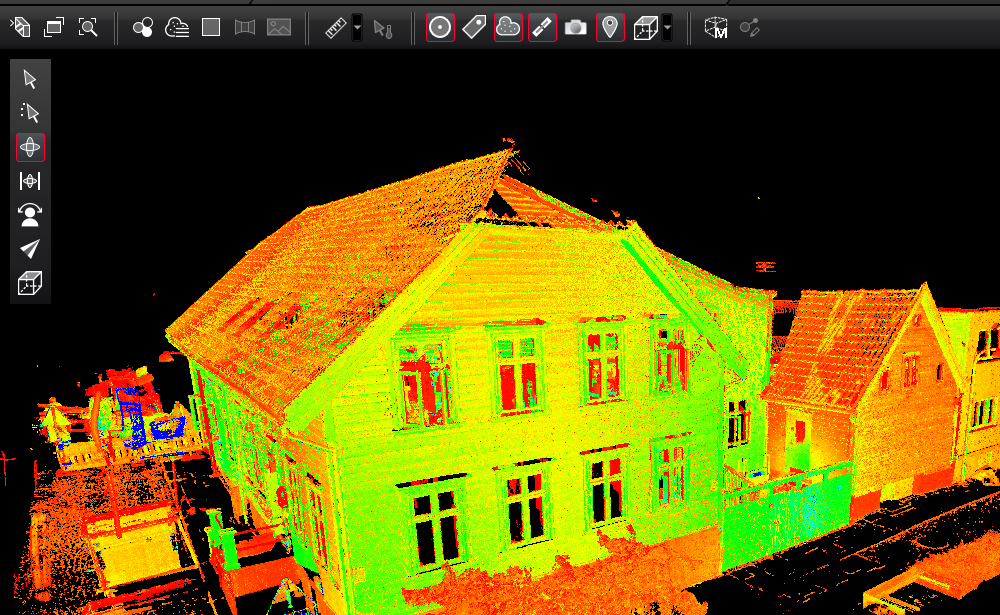
3D laser scanning has become a core technology in architecture, engineering, construction (AEC), manufacturing, and heritage documentation. But the real value of scanning doesn’t come from the scan itself—it comes from 3D laser scanning data processing, where raw point cloud data is transformed into accurate, usable digital deliverables such as CAD models, BIM models, and as-built documentation.
This article explains what the process involves, why it matters, and how it fits into modern digital workflows.
What is 3D Laser Scanning Data Processing?
3D laser scanning data processing refers to the workflow of converting raw point cloud data captured by laser scanners into structured, usable 2D or 3D models.
A laser scanner collects millions (or even billions) of spatial points from an environment. Each point represents a precise X, Y, Z coordinate in space. However, this raw dataset is unorganized and often contains noise, overlaps, and irrelevant data.
Processing is required to:
- Clean and filter the data
- Align multiple scans into a single coordinate system
- Optimize and reduce noise
- Extract meaningful geometry
- Convert point clouds into CAD or BIM deliverables
The 3D Laser Scanning Data Processing Workflow
The processing pipeline typically follows these key stages:
1. Data Import and Organization
The first step is importing raw scan data from the laser scanner into specialized software. Common formats include E57, LAS, RCP, or proprietary scanner formats.
At this stage, scans are organized by location, project area, or scan position.
2. Registration (Scan Alignment)
Since a project often involves multiple scan positions, all scans must be aligned into a single unified coordinate system.
This process is called registration, and it can be done using:
- Target-based alignment (using physical markers)
- Cloud-to-cloud alignment
- Hybrid methods
Accurate registration is critical because even small errors can lead to major modeling inaccuracies downstream.
3. Noise Removal and Cleaning
Raw point clouds often include:
- Moving objects (people, vehicles)
- Reflective noise
- Environmental interference
During cleaning, unwanted data is removed to ensure clarity and accuracy.
This improves model quality and reduces processing time.
4. Segmentation and Classification
In this stage, the point cloud is divided into logical elements such as:
- Walls
- Floors
- Pipes
- Structural steel
- Mechanical systems
Segmentation helps in extracting meaningful components for CAD or BIM modeling.
5. Modeling (CAD or BIM Conversion)
Once the point cloud is prepared, it is used to create a digital model.
Depending on the project requirement:
- CAD modeling focuses on 2D drawings and precise geometry
- BIM modeling focuses on intelligent 3D objects with metadata
Software such as Autodesk Revit, AutoCAD, Navisworks, and others are commonly used.
6. Quality Control and Validation
Before final delivery, the model is checked against the original point cloud to ensure accuracy.
This includes:
- Dimensional validation
- Tolerance checking
- Clash detection (for BIM models)
This step ensures the final output meets project specifications.
7. Final Output Delivery
The processed data is delivered in required formats such as:
- Revit (.RVT) models
- AutoCAD drawings (.DWG)
- IFC files for interoperability
- 3D mesh or surface models
These outputs are used for design, renovation, facility management, or analysis.
Why 3D Laser Scanning Data Processing is Important
Without proper processing, raw scan data has limited use. The value lies in transforming it into actionable information.
Key benefits include:
- High accuracy: Reduces human measurement errors
- Time efficiency: Speeds up design and renovation workflows
- Cost reduction: Minimizes rework and field visits
- Improved decision-making: Provides reliable as-built conditions
- Better collaboration: Standardized digital models for teams
Common Challenges in Data Processing
Despite its advantages, processing scan data comes with challenges:
Large File Sizes
Point clouds can be extremely heavy, requiring powerful hardware and optimized workflows.
Data Noise
Unwanted reflections and movement can reduce data quality.
Complex Geometry
Industrial sites, heritage buildings, or dense mechanical systems are difficult to model accurately.
Software Compatibility
Different tools and formats may create interoperability issues.
Tools Used in 3D Laser Scanning Data Processing
Some widely used tools include:
- Autodesk ReCap
- Autodesk Revit
- Leica Cyclone
- Trimble RealWorks
- CloudCompare
- Bentley Pointools / MicroStation
Each tool has strengths depending on whether the goal is cleaning, registration, or modeling.
Applications Across Industries
3D laser scanning data processing is used in:
- AEC industry: As-built documentation, renovation planning
- Manufacturing: Reverse engineering and quality inspection
- Oil & Gas: Plant modeling and maintenance planning
- Heritage preservation: Digital archiving of monuments
- Infrastructure: Bridges, tunnels, and roads documentation
The Future of 3D Laser Scanning Data Processing
The future of this field is being shaped by automation and AI. Emerging trends include:
- AI-driven point cloud classification
- Automated BIM model generation
- Cloud-based processing workflows
- Real-time scan-to-model conversion
- Integration with digital twins
These innovations are reducing manual effort and increasing speed and accuracy.
Conclusion
3D laser scanning data processing is the bridge between raw spatial data and meaningful digital models. It plays a critical role in modern design, construction, and asset management workflows.